PDS 다이어리란?
PDS(Plan-Do-See) 다이어리는 계획, 실행, 피드백의 과정을 체계적으로 기록하여 자기 계발을 돕는 다이어리입니다. 시판되는 제품을 구매하거나, 블로그나 커뮤니티에서 무료로 배포되는 양식(PDF, PPT, 엑셀 등)을 활용할 수 있습니다.
PDS 다이어리 양식의 핵심 요소
- PLAN(계획): 하루 또는 한 주간의 목표와 세부 계획을 세우는 단계입니다.
- 핵심 목표: 그날 반드시 달성해야 할 중요한 일 1~3가지를 명확히 작성합니다.
- 시간 계획: 하루를 1시간 또는 10분 단위로 나눠 시간대별로 할 일을 구체적으로 기록합니다.
- 우선순위: 계획한 일에 우선순위를 부여하여 중요도에 따라 일을 처리할 수 있도록 합니다.
- DO(실행): 계획한 내용을 실제로 실행하고 기록하는 단계입니다.
- 실행 확인: 계획한 시간대에 실제로 실행했는지 여부를 표시합니다.
- 시간 관리: 계획대로 진행되지 않은 시간을 시각적으로 확인하고 시간 낭비 요소를 파악합니다.
- SEE(피드백): 실행 결과를 되돌아보며 개선점을 찾는 단계입니다.
- 회고(Review): 하루를 마무리하며 잘한 점, 아쉬운 점, 개선할 점 등을 기록합니다.
- 문제 분석: 계획대로 진행되지 않은 원인을 분석하고 다음 계획에 반영할 점을 찾습니다.
주요 기능
이 VBA 프로그램은 다음 기능을 제공합니다:
1. 자동 날짜 입력 시스템
- YYYY-MM-DD 형식의 날짜 입력
- 자동 요일 계산 및 한글 표시
- 날짜 유효성 검증
2. 구조화된 레이아웃
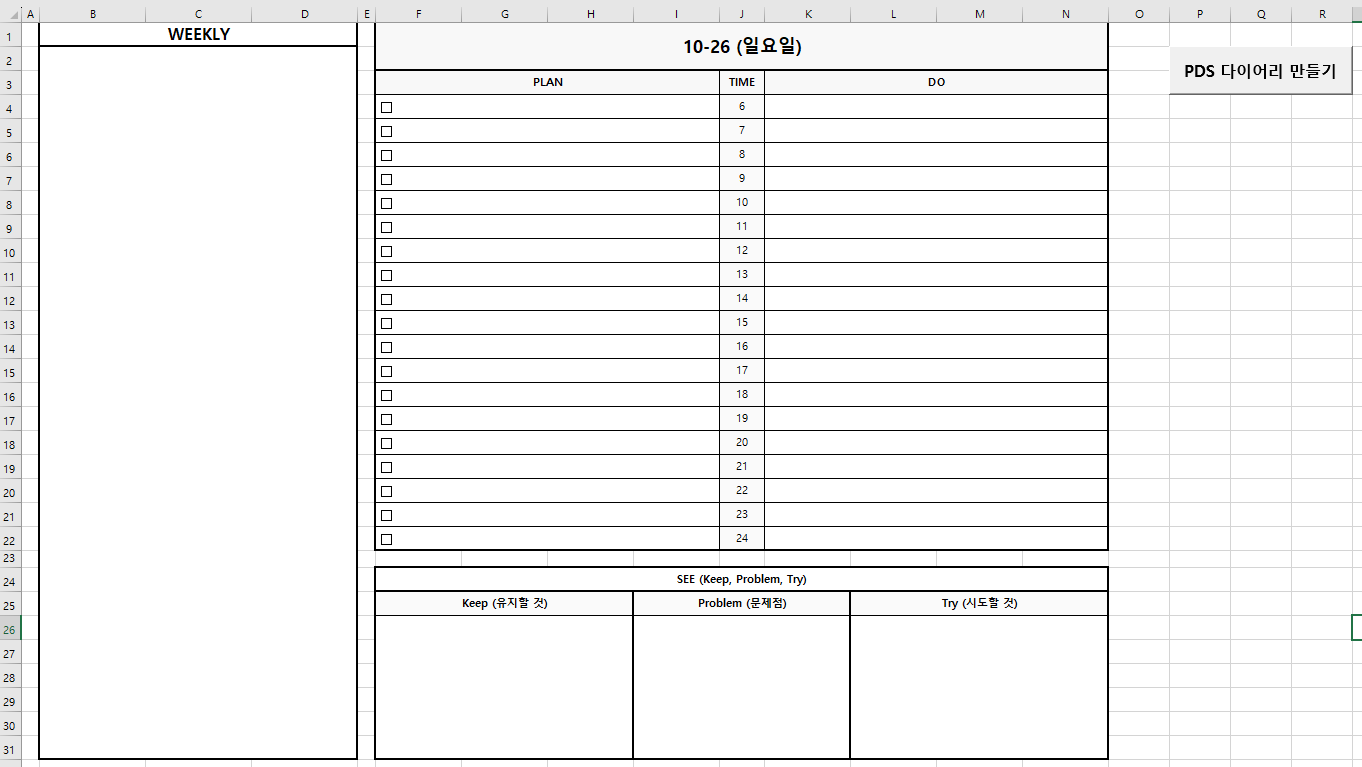
- WEEKLY 섹션: 주간 목표 및 계획
- PLAN/DO 섹션: 시간대별(6시~24시) 계획 및 실행 기록
- SEE 섹션: Keep-Problem-Try 회고
3. 자동 UI 요소
- 체크박스 자동 생성(F4~F22 범위)
- 인쇄 최적화 설정
- 가독성 높은 테두리 및 색상
코드 구조 분석
메인 실행 함수: CreatePDSDiary()
vba
Sub CreatePDSDiary()
    ' 1. 날짜 입력 받기
    ' 2. 유효성 검사
    ' 3. 시트 생성
    ' 4. 레이아웃 구성
End Sub
이 함수는 프로그램의 진입점으로, 사용자 입력부터 다이어리 생성까지 전체 프로세스를 관리합니다.
날짜 검증: IsValidDate()
vba
Function IsValidDate(dateStr As String) As Boolean
    ' YYYY-MM-DD 형식 확인
    ' 하이픈 위치 검증
    ' 실제 날짜 변환 가능 여부 확인
End Function
입력된 날짜가 올바른 형식인지 확인하고, 실제 존재하는 날짜인지 검증합니다.
한글 요일 변환: GetKoreanDayOfWeek()
vba
Function GetKoreanDayOfWeek(targetDate As Date) As String
    Dim days(1 To 7) As String
    days(1) = "일요일"
    ' ... 월~토요일
    dayNum = Weekday(targetDate)
    GetKoreanDayOfWeek = days(dayNum)
End Function
엑셀의 Weekday 함수를 활용하여 한글 요일을 반환합니다.
레이아웃 상세 구조
1. 페이지 설정 (SetupPageLayout)
열 너비:
- A열: 2 (여백)
- B~D열: 15 (WEEKLY 섹션)
- E열: 2 (여백)
- F~N열: 12 (메인 다이어리)
- J열: 6 (시간 표시)

행 높이: 21
화면 줌: 85%
폰트: 맑은 고딕 10pt
2. WEEKLY 섹션 (B1:D31)
주간 목표와 중요 업무를 기록하는 공간입니다. 병합된 셀로 구성되어 자유로운 텍스트 입력이 가능합니다.
3. MEMO 섹션 (F3:N22)
헤더 구조:
- PLAN (F3:I3): 계획
- TIME (J3): 시간
- DO (K3:N3): 실행
시간 블록:
- 6시부터 24시까지 19개 시간대
- 각 시간대마다 체크박스 자동 생성
- PLAN과 DO를 분리하여 계획 대비 실행률 시각화
4. SEE 섹션 (F24:N30)
KPT 회고 프레임워크:
- Keep: 잘한 점, 계속 유지할 것
- Problem: 문제점, 개선이 필요한 것
- Try: 다음에 시도해볼 것
활용 팁
1. 색상 커스터마이징
vba
' 헤더 배경색 변경
.Range("F1:N2").Interior.Color = RGB(248, 248, 248)

' 다른 색상 예시
' 파스텔 블루: RGB(173, 216, 230)
' 파스텔 그린: RGB(198, 226, 198)
' 연한 노랑: RGB(255, 255, 204)
2. 시간 범위 조정
vba
' CreateMemoSection 함수 내부
For hour = 6 To 24  ' 시작 시간과 종료 시간 변경 가능
3. 인쇄 설정 최적화
vba
' printPreviewHorizontal 함수에서 여백 조정
.LeftMargin = Application.InchesToPoints(0.3)
.RightMargin = Application.InchesToPoints(0.5)
설치 및 사용 방법
1. VBA 편집기 열기
- Alt + F11 키를 누르거나
- 개발 도구 탭 → Visual Basic 클릭
2. 모듈 삽입
- 삽입 → 모듈 선택
- 제공된 코드 전체 복사 후 붙여넣기
| ' ======================================== ' PDS 다이어리 만들기 ' ======================================== Option Explicit ' 전역 변수 Dim targetSheet As Worksheet ' 메인 실행 함수 Sub CreatePDSDiary() Dim inputDate As String Dim selectedDate As Date Dim dayOfWeek As String Dim ws As Worksheet Dim sheetName As String On Error Resume Next ' 날짜 입력 받기 inputDate = InputBox("일일 일정표를 만들 날짜를 YYYY-MM-DD 형식으로 입력하세요", "일일 일정표", Format(Date, "yyyy-mm-dd")) ' 취소 버튼 클릭 시 If inputDate = "" Then Exit Sub End If ' 날짜 유효성 검사 If Not IsValidDate(inputDate) Then MsgBox "올바른 날짜 형식이 아닙니다. YYYY-MM-DD 형식으로 입력해주세요.", vbExclamation, "오류" Exit Sub End If ' 날짜 변환 selectedDate = CDate(inputDate) dayOfWeek = GetKoreanDayOfWeek(selectedDate) sheetName = Format(selectedDate, "mmdd") ' 기존 시트 확인 On Error Resume Next Set ws = Worksheets(sheetName) On Error GoTo 0 If Not ws Is Nothing Then ' 같은 날짜의 시트가 이미 존재함 MsgBox "같은 날짜(" & Format(selectedDate, "mm/dd") & ")의 일정표가 이미 존재합니다.", vbInformation, "알림" Exit Sub End If ' 새 시트 생성 Set ws = Worksheets.Add(After:=Worksheets(Worksheets.Count)) ws.Name = sheetName Set targetSheet = ws ' 다이어리 생성 Call SetupPageLayout Call CreateDiaryLayout(selectedDate, dayOfWeek) Call AddCheckboxes Call printPreviewHorizontal ' 첫 번째 입력 셀로 이동 ws.Range("B4").Select MsgBox "다이어리가 생성되었습니다!", vbInformation, "완료" End Sub ' 날짜 유효성 검사 Function IsValidDate(dateStr As String) As Boolean Dim parts() As String Dim tempDate As Date IsValidDate = False ' YYYY-MM-DD 형식 확인 If Len(dateStr) <> 10 Then Exit Function If Mid(dateStr, 5, 1) <> "-" Or Mid(dateStr, 8, 1) <> "-" Then Exit Function On Error Resume Next tempDate = CDate(dateStr) If Err.Number = 0 Then IsValidDate = True End If On Error GoTo 0 End Function ' 한글 요일 반환 Function GetKoreanDayOfWeek(targetDate As Date) As String Dim dayNum As Integer Dim days(1 To 7) As String days(1) = "일요일" days(2) = "월요일" days(3) = "화요일" days(4) = "수요일" days(5) = "목요일" days(6) = "금요일" days(7) = "토요일" dayNum = Weekday(targetDate) GetKoreanDayOfWeek = days(dayNum) End Function ' 페이지 레이아웃 설정 Sub SetupPageLayout() With targetSheet ' 열 너비 설정 .Columns("A").ColumnWidth = 2 .Columns("B:D").ColumnWidth = 15 .Columns("E").ColumnWidth = 2 .Columns("F:N").ColumnWidth = 12 .Columns("J").ColumnWidth = 6 ' 행 높이 기본 설정 .Rows.RowHeight = 21 .Rows(23).RowHeight = 15 ' 화면 설정 ActiveWindow.Zoom = 85 .Cells.Font.Name = "맑은 고딕" .Cells.Font.Size = 10 End With End Sub ' 다이어리 레이아웃 생성 Sub CreateDiaryLayout(selectedDate As Date, dayOfWeek As String) ' 날짜 헤더 생성 Call CreateDateHeader(selectedDate, dayOfWeek) ' WEEKLY 섹션 생성 Call CreateWeeklySection ' MEMO 섹션 생성 Call CreateMemoSection ' SEE 섹션 생성 Call CreateSeeSection End Sub ' 날짜 헤더 생성 Sub CreateDateHeader(selectedDate As Date, dayOfWeek As String) With targetSheet ' 날짜 표시 셀 병합 (F1:N2) .Range("F1:N2").Merge .Range("F1").Value = Format(selectedDate, "mm/dd") & " (" & dayOfWeek & ")" .Range("F1").HorizontalAlignment = xlCenter .Range("F1").VerticalAlignment = xlCenter .Range("F1").Font.Size = 16 .Range("F1").Font.Bold = True ' 테두리 With .Range("F1:N2").Borders .LineStyle = xlContinuous .Weight = xlMedium End With ' 배경색 .Range("F1:N2").Interior.Color = RGB(248, 248, 248) End With End Sub ' WEEKLY 섹션 생성 Sub CreateWeeklySection() Dim startRow As Integer Dim endRow As Integer startRow = 1 endRow = 31 With targetSheet ' WEEKLY 헤더 .Range("B" & startRow & ":D" & startRow).Merge .Range("B" & startRow).Value = "WEEKLY" .Range("B" & startRow).HorizontalAlignment = xlCenter .Range("B" & startRow).Font.Bold = True .Range("B" & startRow).Font.Size = 14 ' 헤더 테두리 With .Range("B" & startRow & ":D" & startRow).Borders .LineStyle = xlContinuous .Weight = xlMedium End With .Range("B" & startRow).Borders(xlEdgeBottom).Weight = xlMedium ' WEEKLY 내용 영역 .Range("B" & (startRow + 1) & ":D" & endRow).Merge .Range("B" & (startRow + 1)).VerticalAlignment = xlTop .Range("B" & (startRow + 1)).WrapText = True ' 전체 테두리 With .Range("B" & startRow & ":D" & endRow).Borders .LineStyle = xlContinuous .Weight = xlMedium End With End With End Sub ' MEMO 섹션 생성 Sub CreateMemoSection() Dim startRow As Integer Dim currentRow As Integer Dim hour As Integer startRow = 3 currentRow = startRow With targetSheet ' MEMO 헤더 .Range("F" & currentRow & ":I" & currentRow).Merge .Range("K" & currentRow & ":N" & currentRow).Merge .Range("F" & currentRow).Value = "PLAN" .Range("K" & currentRow).Value = "DO" .Range("J" & currentRow).Value = "TIME" .Range("F3:N" & currentRow).HorizontalAlignment = xlCenter .Range("F3:N" & currentRow).Font.Bold = True .Range("F3:N" & currentRow).Interior.Color = RGB(248, 248, 248) With .Range("F" & currentRow & ":N" & currentRow).Borders .LineStyle = xlContinuous .Weight = xlMedium End With currentRow = currentRow + 1 ' 시간 블록 생성 (6시 ~ 24시) For hour = 6 To 24 ' 시간 표시 (J열) .Range("J" & currentRow).Value = hour .Range("J" & currentRow).HorizontalAlignment = xlCenter .Range("J" & currentRow).VerticalAlignment = xlCenter .Range("J" & currentRow).Interior.Color = RGB(250, 250, 250) ' 메모 영역 (G:N열 병합) .Range("F" & currentRow & ":I" & currentRow).Merge .Range("K" & currentRow & ":N" & currentRow).Merge .Range("G" & currentRow).WrapText = True .Range("F" & currentRow).IndentLevel = 2 ' 테두리 With .Range("F" & currentRow & ":N" & currentRow).Borders .LineStyle = xlContinuous .Weight = xlThin End With currentRow = currentRow + 1 Next hour ' 외곽 테두리 강조 With .Range("F" & startRow & ":N" & (currentRow - 1)).Borders .LineStyle = xlContinuous End With .Range("F" & startRow & ":N" & (currentRow - 1)).BorderAround LineStyle:=xlContinuous, Weight:=xlMedium End With End Sub ' SEE 섹션 생성 Sub CreateSeeSection() Dim startRow As Integer Dim seeStartCol As Integer Dim colOffset As Integer Dim titles As Variant Dim i As Integer startRow = 24 seeStartCol = 6 ' F열 titles = Array("Keep (유지할 것)", "Problem (문제점)", "Try (시도할 것)") With targetSheet ' SEE 헤더 .Range("F" & startRow & ":N" & startRow).Merge .Range("F" & startRow).Value = "SEE (Keep, Problem, Try)" .Range("F" & startRow).Font.Bold = True .Range("F" & startRow).HorizontalAlignment = xlCenter With .Range("F" & startRow & ":N" & startRow).Borders .LineStyle = xlContinuous .Weight = xlMedium End With startRow = startRow + 1 ' Keep, Problem, Try 3개 영역 For i = 0 To 2 colOffset = i * 3 ' 제목 .Range(.Cells(startRow, seeStartCol + colOffset), .Cells(startRow, seeStartCol + colOffset + 2)).Merge .Range(.Cells(startRow, seeStartCol + colOffset), .Cells(startRow, seeStartCol + colOffset + 2)).Value = titles(i) .Range(.Cells(startRow, seeStartCol + colOffset), .Cells(startRow, seeStartCol + colOffset + 2)).Font.Bold = True .Range(.Cells(startRow, seeStartCol + colOffset), .Cells(startRow, seeStartCol + colOffset + 2)).Interior.Color = RGB(250, 250, 250) ' 내용 영역 (6행) .Range(.Cells(startRow + 1, seeStartCol + colOffset), .Cells(startRow + 6, seeStartCol + colOffset + 2)).Merge .Range(.Cells(startRow + 1, seeStartCol + colOffset), .Cells(startRow + 1, seeStartCol + colOffset + 2)).WrapText = True .Range(.Cells(startRow + 1, seeStartCol + colOffset), .Cells(startRow + 1, seeStartCol + colOffset + 2)).VerticalAlignment = xlTop ' 테두리 With .Range(.Cells(startRow, seeStartCol + colOffset), .Cells(startRow + 6, seeStartCol + colOffset + 2)).Borders .LineStyle = xlContinuous .Weight = xlThin End With .Range(.Cells(startRow, seeStartCol + colOffset), .Cells(startRow + 6, seeStartCol + colOffset + 2)).BorderAround _ LineStyle:=xlContinuous, Weight:=xlMedium Next i .Range("F25:N25").HorizontalAlignment = xlCenter ' 전체 SEE 섹션 외곽 테두리 .Range("F" & (startRow - 1) & ":N" & (startRow + 6)).BorderAround LineStyle:=xlContinuous, Weight:=xlMedium End With End Sub ' 체크박스 추가 (F4:F22) Sub AddCheckboxes() Dim i As Integer Dim chkBox As CheckBox Dim cellRange As Range With targetSheet ' F4부터 F22까지 체크박스 추가 For i = 4 To 22 Set cellRange = .Range("F" & i) ' 체크박스 추가 Set chkBox = .CheckBoxes.Add(cellRange.Left + 2, cellRange.Top + 2, cellRange.Width - 4, cellRange.Height - 4) With chkBox .Caption = "" ' 캡션 제거 .Value = xlOff ' 체크 해제 상태 .Display3DShading = False End With Next i End With End Sub Private Sub printPreviewHorizontal() Dim sht As Worksheet If Workbooks.Count < 1 Then MsgBox "열려있는 파일이 없습니다." Exit Sub End If For Each sht In ActiveWindow.SelectedSheets With sht.PageSetup .LeftMargin = Application.InchesToPoints(0.3): .RightMargin = Application.InchesToPoints(0.5) .TopMargin = Application.InchesToPoints(0.5): .BottomMargin = Application.InchesToPoints(0.4) .HeaderMargin = Application.InchesToPoints(0.315): .FooterMargin = Application.InchesToPoints(0.197) .CenterHorizontally = True .Orientation = xlLandscape: .PrintComments = xlPrintInPlace .Zoom = False: .FitToPagesWide = 1: .FitToPagesTall = False End With Next sht ' ActiveWindow.SelectedSheets.PrintPreview End Sub |
3. 실행
- Alt + F8 키로 매크로 실행 창 열기
- CreatePDSDiary 선택 후 실행
- 날짜 입력 (예: 2025-10-27)
주의사항
- 시트 이름 중복: 같은 날짜의 다이어리는 생성되지 않습니다
- 체크박스 개수: 시간 블록 개수에 맞춰 자동 조정됩니다
- 인쇄 설정: 가로 방향, A4 용지 기준으로 최적화되어 있습니다