안녕하세요, VBA로 업무 시간을 절반 이상 줄여드리는 노만e입니다.
오늘은 회사에서 가장 귀찮은 업무 중 하나인 여러 시트·여러 파일의 데이터 통합을,
단 몇 초 만에 자동으로 처리하는 방법을 알려드리겠습니다.
❗ 돌발 상황
- 보고서 제출일 전날, 부서별 파일이 수십 개씩 쏟아짐
- 매번 복사+붙여넣기 하다가 서식 깨짐, 스타일 과다, 스트레스 팍팍
- 시트별 구조는 같지만 파일이 너무 많아 시간 낭비하고 있다면,
혹시 이런 경험 있으신가요?
이제 이런 고생은 끝입니다.
🚀 사용 방법
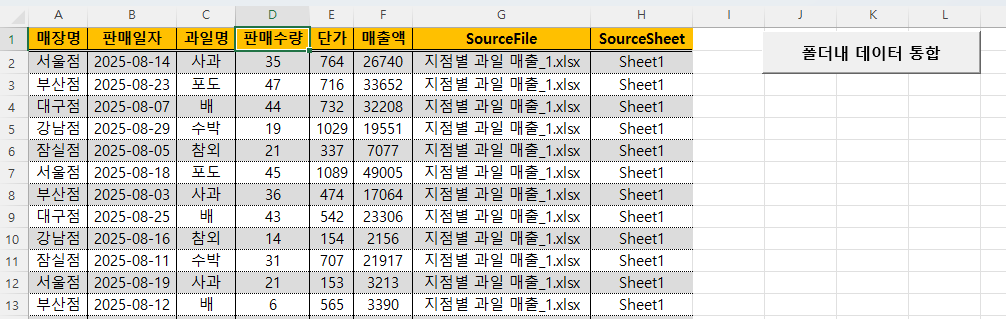
- 지점별 과일 매출 통합파일에 있는 [폴더내 데이터 통합] 버튼 클릭
- 파일이 저장되어 있는 폴더 선택
- 데이터 통합 완료
✅ 팁
- 파일 구조가 동일해야 합니다. (열 순서·이름 동일)
- *.xlsx *.xlsm 매크로 포함 파일도 합칠 수 있습니다.
- 시트가 여러 개인 경우도 상관없이 전부 합쳐 집니다.
오늘 공유한 VBA 데이터 합치기 코드, 도움이 되셨나요?
업무 시간을 줄이는 방법을 앞으로도 계속 공유드릴게요.
vba 코드
| Option Explicit Public Sub CombineFilesIntoMaster() On Error GoTo EH Dim fldr As FileDialog Dim fol As String Dim wbSrc As Workbook Dim ws As Worksheet Dim master As Worksheet Dim fName As String Dim firstWrite As Boolean Dim nextRow As Long Dim dataRng As Range, copyRng As Range Dim hdrCols As Long '환경 최적화 Application.ScreenUpdating = False Application.EnableEvents = False Application.Calculation = xlCalculationManual '폴더 선택 Set fldr = Application.FileDialog(msoFileDialogFolderPicker) With fldr .Title = "데이터를 합칠 폴더를 선택하세요" If .Show <> -1 Then GoTo CleanExit '사용자 취소 fol = .SelectedItems(1) End With '마스터 시트 준비 Set master = GetOrCreateSheet("_Master") master.Cells.Clear firstWrite = True '폴더 내 파일 순회 fName = Dir(fol & "\*.*") Do While Len(fName) > 0 If IsTargetFile(fName) Then Set wbSrc = Workbooks.Open(Filename:=fol & "\" & fName, ReadOnly:=True) For Each ws In wbSrc.Worksheets Set dataRng = GetDataRange(ws) If Not dataRng Is Nothing Then If firstWrite Then hdrCols = dataRng.Columns.Count '헤더 master.Range("A1").Resize(1, hdrCols).Value = dataRng.Rows(1).Value master.Cells(1, hdrCols + 1).Value = "SourceFile" master.Cells(1, hdrCols + 2).Value = "SourceSheet" '데이터(헤더 제외) If dataRng.Rows.Count > 1 Then Set copyRng = dataRng.Offset(1).Resize(dataRng.Rows.Count - 1) nextRow = 2 master.Cells(nextRow, 1).Resize(copyRng.Rows.Count, hdrCols).Value = copyRng.Value master.Cells(nextRow, hdrCols + 1).Resize(copyRng.Rows.Count).Value = wbSrc.Name master.Cells(nextRow, hdrCols + 2).Resize(copyRng.Rows.Count).Value = ws.Name nextRow = nextRow + copyRng.Rows.Count Else nextRow = 2 End If firstWrite = False Else '이후 파일/시트: 데이터만 If dataRng.Rows.Count > 1 Then Set copyRng = dataRng.Offset(1).Resize(dataRng.Rows.Count - 1) nextRow = NextEmptyRow(master) master.Cells(nextRow, 1).Resize(copyRng.Rows.Count, hdrCols).Value = copyRng.Value master.Cells(nextRow, hdrCols + 1).Resize(copyRng.Rows.Count).Value = wbSrc.Name master.Cells(nextRow, hdrCols + 2).Resize(copyRng.Rows.Count).Value = ws.Name End If End If End If Next ws wbSrc.Close SaveChanges:=False End If fName = Dir Loop '포맷 With master .Rows(1).Font.Bold = True .Columns.AutoFit End With MsgBox "데이터 병합 완료 (시트: _Master)", vbInformation, "Combine ?" CleanExit: Application.ScreenUpdating = True Application.EnableEvents = True Application.Calculation = xlCalculationAutomatic Exit Sub EH: MsgBox "오류 " & Err.Number & " : " & Err.Description, vbExclamation, "CombineFilesIntoMaster" Resume CleanExit End Sub '=== 대상 확장자 필터 === Private Function IsTargetFile(ByVal fName As String) As Boolean Dim ext As String ext = LCase$(Mid$(fName, InStrRev(fName, ".") + 1)) IsTargetFile = (ext = "xlsx" Or ext = "xlsm" Or ext = "xlsb" Or ext = "csv") End Function '=== 마스터 시트 생성/가져오기 === Private Function GetOrCreateSheet(ByVal sName As String) As Worksheet On Error Resume Next Set GetOrCreateSheet = ThisWorkbook.Worksheets(sName) On Error GoTo 0 If GetOrCreateSheet Is Nothing Then Set GetOrCreateSheet = ThisWorkbook.Worksheets.Add(After:=ThisWorkbook.Worksheets(ThisWorkbook.Worksheets.Count)) GetOrCreateSheet.Name = sName End If End Function '=== 실제 데이터 범위 추출(빈 시트/머리글만 있는 시트 제외) === Private Function GetDataRange(ws As Worksheet) As Range Dim ur As Range On Error Resume Next Set ur = ws.UsedRange On Error GoTo 0 If ur Is Nothing Then Exit Function If Application.WorksheetFunction.CountA(ur) = 0 Then Exit Function '빈 시트 Set GetDataRange = ur End Function '=== 다음 빈 행 === Private Function NextEmptyRow(sh As Worksheet) As Long Dim r As Long r = sh.Cells(sh.Rows.Count, 1).End(xlUp).Row If r < 1 Then r = 1 If Application.WorksheetFunction.CountA(sh.Rows(1)) = 0 Then NextEmptyRow = 1 Else NextEmptyRow = r + 1 End If End Function |